Setup an SSTV or WEFAX image gallery on your website
iDigi can automatically upload received SSTV and WEFAX images to an FTP server. This allows you to have an online gallery of received images.
Please proceed as follows:
1. Configure SSTV/WEFAX upload on the Integrations tab in iDigi preferences
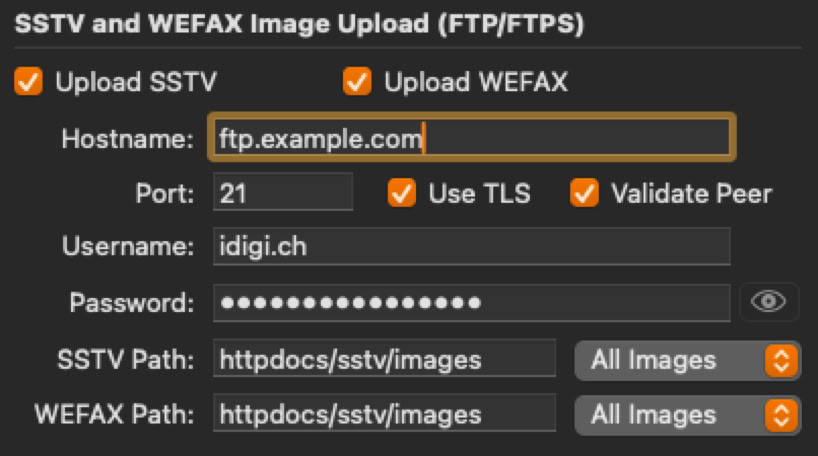
Enable Upload SSTV and/or Uplaod WEFAX, depending of what you would like to have automatically uplaoded. Enter your FTP connection details and credentials, enable Use TLS and Validate Peer if supported by your provider. Please note that you credentials are transmitted in the clear if TLS is not used.
Enter the path(s) where to put the images relatively to your Web server's base directory. HTML content often lives in htdocs or httpdocs.
2. If you don't have an existing gallery page that will display the images, you may use this one provided by me. Download this ZIP file and upzip.
3. Put this index.php file somewhere on your webserver and create a subdirectory in the same place called 'images' -> this is the directory you have to enter in the path in iDigi's preferences.
4. Enable PHP on your Web server.
Have a look at my gallery at https://idigi.ch/sstv/index.php for reference.